11 Ocak 2017 Çarşamba

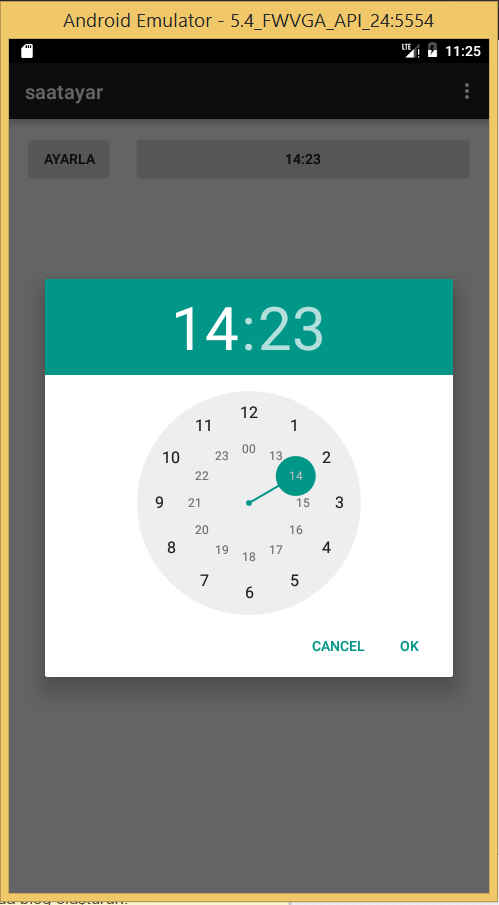
Android Programlama:TimePicker kullanarak zaman değerini ayarlama

2017-01-11_14-25-20.png
activity_main.xml;
<RelativeLayout xmlns:android="http://schemas.android.com/apk/res/android"
    xmlns:tools="http://schemas.android.com/tools"
    android:layout_width="fill_parent"
    android:layout_height="match_parent"
    android:paddingBottom="@dimen/activity_vertical_margin"
    android:paddingLeft="@dimen/activity_horizontal_margin"
    android:paddingRight="@dimen/activity_horizontal_margin"
    android:paddingTop="@dimen/activity_vertical_margin"
    tools:context=".MainActivity" >

    <LinearLayout
        android:id="@+id/LinearLayout01"
        android:layout_width="fill_parent"
        android:layout_height="wrap_content"
        android:orientation="horizontal" >

        <Button
            android:layout_width="wrap_content"
            android:layout_height="wrap_content"
            android:text="Ayarla"
            android:id="@+id/btnTime"
            android:paddingLeft="15dp"
            android:paddingRight="15dp"
            />

        <Button
            android:layout_width="fill_parent"
            android:layout_height="wrap_content"
            android:id="@+id/txtTime"
            android:layout_marginLeft="20dp"
            />
        <Button
            android:layout_width="fill_parent"
            android:layout_height="wrap_content"
            android:id="@+id/txtTime2"
            android:layout_marginLeft="20dp"
            />
        <TimePicker
            android:id="@+id/timePicker"
            android:layout_width="wrap_content"
            android:layout_height="wrap_content"
            android:timePickerMode="spinner"
            android:visibility="gone" />

    </LinearLayout>

</RelativeLayout>
MainActivity.java;
package com.example.okul.saatayar;

import android.app.Dialog;
import android.app.TimePickerDialog;
import android.support.v7.app.ActionBarActivity;
import android.os.Bundle;
import android.view.Menu;
import android.view.MenuItem;
import android.view.View;
import android.widget.Button;
import android.widget.TextView;
import android.widget.TimePicker;

import java.util.Calendar;


public class MainActivity extends ActionBarActivity {

    private Button saatsec2txt = null;
    private TimePicker timePicker;
    private int hour;
    private int minute;

    static final int TIME_DIALOG_ID = 999;
    @Override
    protected void onCreate(Bundle savedInstanceState) {
        super.onCreate(savedInstanceState);
        setContentView(R.layout.activity_main);
        saatsec2txt = (Button) findViewById(R.id.txtTime);
        timePicker = (TimePicker) findViewById(R.id.timePicker);

        final Calendar c = Calendar.getInstance();
        hour = c.get(Calendar.HOUR_OF_DAY);
        minute = c.get(Calendar.MINUTE);
        saatsec2txt.setText(new StringBuilder().append(padding_str(hour)).append(":").append(padding_str(minute)));

        timePicker.setCurrentHour(hour);
        timePicker.setCurrentMinute(minute);
        saatsec2txt.setOnClickListener(clickListener);
    }

    private View.OnClickListener clickListener = new View.OnClickListener()
    {
        public void onClick(View v)
        {
            switch (v.getId())
            {
                case R.id.txtTime:
                    showDialog(TIME_DIALOG_ID);
                    break;
            }
        }
    };

    @Override
    public boolean onCreateOptionsMenu(Menu menu) {
        // Inflate the menu; this adds items to the action bar if it is present.
        getMenuInflater().inflate(R.menu.menu_main, menu);
        return true;
    }

    @Override
    public boolean onOptionsItemSelected(MenuItem item) {
        // Handle action bar item clicks here. The action bar will
        // automatically handle clicks on the Home/Up button, so long
        // as you specify a parent activity in AndroidManifest.xml.
        int id = item.getItemId();

        //noinspection SimplifiableIfStatement
        if (id == R.id.action_settings) {
            return true;
        }

        return super.onOptionsItemSelected(item);
    }
    @Override
    protected Dialog onCreateDialog(int id) {
        switch (id) {
            case TIME_DIALOG_ID:
                return new TimePickerDialog(this, timePickerListener, hour, minute,true);
        }
        return null;
    }

    private TimePickerDialog.OnTimeSetListener timePickerListener =  new TimePickerDialog.OnTimeSetListener()
    {
        public void onTimeSet(TimePicker view, int selectedHour, int selectedMinute) {
            hour = selectedHour;
            minute = selectedMinute;
            saatsec2txt.setText(new StringBuilder().append(padding_str(hour)).append(":").append(padding_str(minute)));
            timePicker.setCurrentHour(hour);
            timePicker.setCurrentMinute(minute);
        }
    };

    private static String padding_str(int c)
    {
        if (c >= 10)
            return String.valueOf(c);
        else
            return "0" + String.valueOf(c);
    }
}

AndroidManifest.xml;
<?xml version="1.0" encoding="utf-8"?>
<manifest xmlns:android="http://schemas.android.com/apk/res/android"
    package="com.example.okul.saatayar" >

    <application
        android:allowBackup="true"
        android:icon="@mipmap/ic_launcher"
        android:label="@string/app_name"
        android:theme="@style/AppTheme" >
        <activity
            android:name=".MainActivity"
            android:label="@string/app_name" >
            <intent-filter>
                <action android:name="android.intent.action.MAIN" />

                <category android:name="android.intent.category.LAUNCHER" />
            </intent-filter>
        </activity>
    </application>

</manifest>

Android Programlama:DatePicker, TimePicker, FragmentManager Kullanarak Mesaj Kutusu ile Saat ve Dakika Ayarlama


activity_main.xml;
<RelativeLayout xmlns:android="http://schemas.android.com/apk/res/android"
    xmlns:tools="http://schemas.android.com/tools" android:layout_width="match_parent"
    android:layout_height="match_parent" android:paddingLeft="@dimen/activity_horizontal_margin"
    android:paddingRight="@dimen/activity_horizontal_margin"
    android:paddingTop="@dimen/activity_vertical_margin"
    android:paddingBottom="@dimen/activity_vertical_margin" tools:context=".MainActivity">

    <TextView android:text="Saat/Dakika Ayarla" android:layout_width="wrap_content"
        android:layout_height="wrap_content"
        android:id="@+id/textView" />

    <Button
        android:text="Saat Ayarla"
        android:layout_width="fill_parent"
        android:layout_height="wrap_content"
        android:id="@+id/txtTime"
        android:layout_below="@+id/textView"
        android:layout_alignParentLeft="true"
        android:layout_alignParentStart="true" />
    <TimePicker
        android:id="@+id/timePicker"
        android:layout_width="wrap_content"
        android:layout_height="wrap_content"
        android:timePickerMode="spinner"
        android:visibility="gone" />
    <Button
        android:text="Dakika Seç"
        android:layout_width="fill_parent"
        android:layout_height="wrap_content"
        android:id="@+id/txtderecesec"
        android:layout_below="@+id/txtTime"
        android:layout_alignParentRight="true"
        android:layout_alignParentEnd="true" />
    <Button
        android:id="@+id/eklemsj"
        android:layout_width="match_parent"
        android:layout_height="wrap_content"
        android:text="Mesaj Kutusu"
        android:layout_below="@+id/txtderecesec"
        android:layout_alignParentRight="true"
        android:layout_alignParentEnd="true" />


</RelativeLayout>
fragment_sample_dialog.xml
<?xml version="1.0" encoding="utf-8"?>
<LinearLayout xmlns:android="http://schemas.android.com/apk/res/android"
    android:layout_width="match_parent" android:layout_height="match_parent"
    android:orientation="vertical">


    <TextView
        android:id="@+id/title"
        android:layout_width="wrap_content"
        android:layout_height="wrap_content"
        android:text="Lorem ipsum dolor sit amet..."
        android:textSize="20dp" />

    <Button
        android:id="@+id/dismiss"
        android:layout_width="match_parent"
        android:layout_height="wrap_content"
        android:text="Dismiss" />

</LinearLayout>
MainActivity.java;
package com.example.okul.saat3;

import android.app.DatePickerDialog;
import android.app.FragmentManager;
import android.app.TimePickerDialog;
import android.support.v4.app.FragmentActivity;
import android.support.v7.app.ActionBarActivity;
import android.os.Bundle;
import android.view.Menu;
import android.view.MenuItem;
import android.view.View;
import android.widget.Button;
import android.widget.TimePicker;

import java.util.Calendar;


public class MainActivity extends FragmentActivity {
    String saat="00";
    String dakika="00";
    String derece1="00";

    @Override
    protected void onCreate(Bundle savedInstanceState) {
        super.onCreate(savedInstanceState);
        setContentView(R.layout.activity_main);
        final Button saatsec1txt = (Button) findViewById(R.id.txtTime);
        final Button derecesectxt=(Button) findViewById(R.id.txtderecesec);
        final Button eklemsj=(Button) findViewById(R.id.eklemsj);
        eklemsj .setOnClickListener(new View.OnClickListener() {
            @Override
            public void onClick(View v) {
                FragmentManager fm = getFragmentManager();
                MyDialogFragment dialogFragment = new MyDialogFragment();
                dialogFragment.show(fm, "Sample Fragment");

            }
        });

        saatsec1txt.setOnClickListener(new View.OnClickListener() {
            @Override
            public void onClick(View v) {
                Calendar mcurrentTime = Calendar.getInstance();//
                int hour = mcurrentTime.get(Calendar.HOUR_OF_DAY);//Güncel saati aldık
                int minute = mcurrentTime.get(Calendar.MINUTE);//Güncel dakikayı aldık
                TimePickerDialog timePicker; //Time Picker referansımızı oluşturduk

                //TimePicker objemizi oluşturuyor ve click listener ekliyoruz
                timePicker = new TimePickerDialog(MainActivity.this, new TimePickerDialog.OnTimeSetListener() {
                    @Override
                    public void onTimeSet(TimePicker timePicker, int selectedHour, int selectedMinute) {
                        saat=Integer.toString(selectedHour);
                        dakika=Integer.toString(selectedMinute);
                        if(saat.length()==1){
                            saat="0"+saat;
                        }
                        if(dakika.length()==1){
                            dakika="0"+dakika;
                        }
                        saatsec1txt.setText(saat + ":" + dakika);//Ayarla butonu tıklandığında textview'a yazdırıyoruz
                    }
                }, hour, minute, true);//true 24 saatli sistem için
                timePicker.setTitle("Saat Seçiniz");
                timePicker.setButton(DatePickerDialog.BUTTON_POSITIVE, "Ayarla", timePicker);
                timePicker.setButton(DatePickerDialog.BUTTON_NEGATIVE, "İptal", timePicker);

                timePicker.show();
            }
        });
        derecesectxt.setOnClickListener(new View.OnClickListener() {
            @Override
            public void onClick(View v) {
                int derece = 10;

                TimePickerDialog derecepicker;
                derecepicker = new TimePickerDialog(MainActivity.this, new TimePickerDialog.OnTimeSetListener() {
                    @Override
                    public void onTimeSet(TimePicker view, int hourOfDay, int minute) {

                        derece1 = Integer.toString(minute);
                        derecesectxt.setText(derece1);

                    }
                }, 0, derece, true);

                derecepicker.setTitle("Dakika Seç");
                derecepicker.setButton(DatePickerDialog.BUTTON_POSITIVE, "Ayarla", derecepicker);
                derecepicker.setButton(DatePickerDialog.BUTTON_NEGATIVE, "İptal", derecepicker);
                derecepicker.show();
            }
        });

    }

    @Override
    public boolean onCreateOptionsMenu(Menu menu) {
        // Inflate the menu; this adds items to the action bar if it is present.
        getMenuInflater().inflate(R.menu.menu_main, menu);
        return true;
    }

    @Override
    public boolean onOptionsItemSelected(MenuItem item) {
        // Handle action bar item clicks here. The action bar will
        // automatically handle clicks on the Home/Up button, so long
        // as you specify a parent activity in AndroidManifest.xml.
        int id = item.getItemId();

        //noinspection SimplifiableIfStatement
        if (id == R.id.action_settings) {
            return true;
        }

        return super.onOptionsItemSelected(item);
    }

}

MyDialogFragment.java;
package com.example.okul.saat3;

import android.app.AlertDialog;
import android.app.Dialog;
import android.app.DialogFragment;
import android.content.DialogInterface;
import android.os.Bundle;
import android.view.LayoutInflater;
import android.view.View;
import android.view.ViewGroup;
import android.widget.Button;

/**
 * Created by okul on 4.6.2016.
 */
public class MyDialogFragment extends DialogFragment{
    @Override
    public View onCreateView(LayoutInflater inflater, ViewGroup container, Bundle savedInstanceState) {
        View rootView = inflater.inflate(R.layout.fragment_sample_dialog, container, false);
        getDialog().setTitle("Simple Dialog");
        Button dismiss = (Button) rootView.findViewById(R.id.dismiss);
        dismiss.setOnClickListener(new View.OnClickListener() {

            @Override
            public void onClick(View v) {
                dismiss();
            }
        });
        return rootView;

    }
    @Override
    public Dialog onCreateDialog(Bundle savedInstanceState) {
        AlertDialog.Builder builder = new AlertDialog.Builder(getActivity());
        builder.setTitle("Mesaj Kutusu");
        builder.setMessage("Buraya Mesajını yaz");

        builder.setPositiveButton("Ok", new DialogInterface.OnClickListener() {
            @Override
            public void onClick(DialogInterface dialog, int which) {
                dismiss();
            }
        });

        builder.setNegativeButton("Cancel", new DialogInterface.OnClickListener() {
            @Override
            public void onClick(DialogInterface dialog, int which) {
                dismiss();
            }
        });

        return builder.create();
    }

}

AndroidManifest.xml;
<?xml version="1.0" encoding="utf-8"?>
<manifest xmlns:android="http://schemas.android.com/apk/res/android"
    package="com.example.okul.saat3" >

    <application
        android:allowBackup="true"
        android:icon="@mipmap/ic_launcher"
        android:label="@string/app_name"
        android:theme="@style/AppTheme" >
        <activity
            android:name=".MainActivity"
            android:label="@string/app_name" >
            <intent-filter>
                <action android:name="android.intent.action.MAIN" />

                <category android:name="android.intent.category.LAUNCHER" />
            </intent-filter>
        </activity>
    </application>

</manifest>

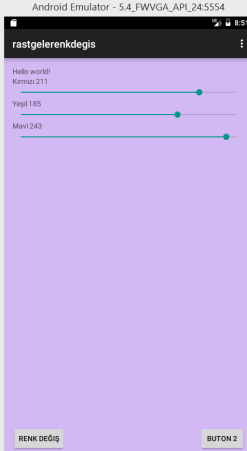
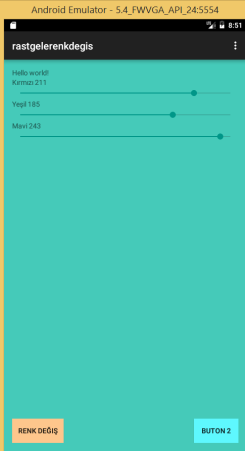
Android Programlama: Arkaplan (background color) renklerini değiştirme.

2017-01-11_11-51-38
activity_main.xml;
<RelativeLayout xmlns:android="http://schemas.android.com/apk/res/android"
    xmlns:tools="http://schemas.android.com/tools" android:layout_width="match_parent"
    android:layout_height="match_parent" android:paddingLeft="@dimen/activity_horizontal_margin"
    android:paddingRight="@dimen/activity_horizontal_margin"
    android:paddingTop="@dimen/activity_vertical_margin"
    android:paddingBottom="@dimen/activity_vertical_margin" tools:context=".MainActivity"
    android:id="@+id/rlZemin">

    <TextView android:text="@string/hello_world" android:layout_width="wrap_content"
        android:layout_height="wrap_content"
        android:id="@+id/textView" />

    <Button
        android:layout_width="wrap_content"
        android:layout_height="wrap_content"
        android:text="Renk Değiş"
        android:id="@+id/btnRenkDegis"
        android:onClick="btnRenkDegisClick"
        android:layout_alignParentBottom="true"
        android:layout_alignParentLeft="true"
        android:layout_alignParentStart="true" />

    <Button
        android:layout_width="wrap_content"
        android:layout_height="wrap_content"
        android:text="buton 2"
        android:id="@+id/btnNew"
        android:onClick="btnYeniClick"
        android:layout_alignParentBottom="true"
        android:layout_alignParentRight="true"
        android:layout_alignParentEnd="true" />

    <LinearLayout
        android:orientation="vertical"
        android:layout_width="match_parent"
        android:layout_height="match_parent"
        android:layout_below="@+id/textView"
        android:layout_alignParentLeft="true"
        android:layout_alignParentStart="true"
        android:layout_above="@+id/btnRenkDegis">

        <TextView
            android:layout_width="wrap_content"
            android:layout_height="wrap_content"
            android:text="Kırmızı"
            android:id="@+id/txtRed" />

        <SeekBar
            android:layout_width="match_parent"
            android:layout_height="wrap_content"
            android:id="@+id/sbRed"
            android:indeterminate="false"
            android:max="255"
            android:progress="128" />

        <TextView
            android:layout_width="wrap_content"
            android:layout_height="wrap_content"
            android:text="Yeşil"
            android:id="@+id/txtGreen" />

        <SeekBar
            android:layout_width="match_parent"
            android:layout_height="wrap_content"
            android:id="@+id/sbGreen"
            android:indeterminate="false"
            android:max="255" />

        <TextView
            android:layout_width="wrap_content"
            android:layout_height="wrap_content"
            android:text="Mavi"
            android:id="@+id/txtBlue" />

        <SeekBar
            android:layout_width="match_parent"
            android:layout_height="wrap_content"
            android:id="@+id/sbBlue"
            android:indeterminate="false"
            android:max="255" />

    </LinearLayout>

</RelativeLayout>
MainActivity.java;
package com.example.okul.rastgelerenkdegis;

import android.graphics.Color;
import android.support.v7.app.ActionBarActivity;
import android.os.Bundle;
import android.view.Menu;
import android.view.MenuItem;
import android.view.View;
import android.widget.Button;
import android.widget.RelativeLayout;
import android.widget.SeekBar;
import android.widget.TextView;

import java.util.Random;


public class MainActivity extends ActionBarActivity {
    RelativeLayout rl;
    Button btnD,btnY;
    SeekBar sbRed,sbGreen,sbBlue;
    TextView txtRed,txtGreen,txtBlue;

    @Override
    protected void onCreate(Bundle savedInstanceState) {
        super.onCreate(savedInstanceState);
        setContentView(R.layout.activity_main);
        rl=(RelativeLayout) findViewById(R.id.rlZemin);//nesnenin zemin rengini yakala
        btnD=(Button) findViewById(R.id.btnRenkDegis);
        btnY=(Button) findViewById(R.id.btnNew);
        sbRed=(SeekBar) findViewById(R.id.sbRed);
        sbGreen=(SeekBar) findViewById(R.id.sbGreen);
        sbBlue=(SeekBar) findViewById(R.id.sbBlue);
        sbRed.setOnSeekBarChangeListener(new KaydirmaOlayTutucu());
        sbGreen.setOnSeekBarChangeListener(new KaydirmaOlayTutucu());
        sbBlue.setOnSeekBarChangeListener(new KaydirmaOlayTutucu());
        txtRed=(TextView) findViewById(R.id.txtRed);
        txtGreen=(TextView) findViewById(R.id.txtGreen);
        txtBlue=(TextView) findViewById(R.id.txtBlue);

     
    }

    @Override
    public boolean onCreateOptionsMenu(Menu menu) {
        // Inflate the menu; this adds items to the action bar if it is present.
        getMenuInflater().inflate(R.menu.menu_main, menu);
        return true;
    }

    @Override
    public boolean onOptionsItemSelected(MenuItem item) {
        // Handle action bar item clicks here. The action bar will
        // automatically handle clicks on the Home/Up button, so long
        // as you specify a parent activity in AndroidManifest.xml.
        int id = item.getItemId();

        //noinspection SimplifiableIfStatement
        if (id == R.id.action_settings) {
            return true;
        }

        return super.onOptionsItemSelected(item);
    }

    public void btnRenkDegisClick(View view) {
        int renk = RenkGetir();
        rl.setBackgroundColor(renk);
        btnD.setBackgroundColor(RenkGetir());
        btnY.setBackgroundColor(RenkGetir());


    }

    private int RenkGetir() {
        Random rnd=new Random();//rastgele sayy üretme
        int red=rnd.nextInt(255);
        int green=rnd.nextInt(255);
        int blue=rnd.nextInt(255);
        return Color.rgb(red, green, blue);
    }//sag tuş refactor/extract/method otomatik metod oluştur.

    public void btnYeniClick(View deneme){

    }
    public class KaydirmaOlayTutucu implements  SeekBar.OnSeekBarChangeListener
    {

        @Override
        public void onProgressChanged(SeekBar seekBar, int progress, boolean fromUser) {
            int kirmizi=sbRed.getProgress();
            int yesil=sbGreen.getProgress();
            int mavi=sbBlue.getProgress();
            rl.setBackgroundColor(Color.rgb(kirmizi,yesil,mavi));
            txtRed.setText("Kırmızı " + kirmizi);
            txtGreen.setText("Yeşil " + yesil);
            txtBlue.setText("Mavi "+ mavi);
        }

        @Override
        public void onStartTrackingTouch(SeekBar seekBar) {

        }

        @Override
        public void onStopTrackingTouch(SeekBar seekBar) {

        }
    }


}

AndroidManifest.xml;
<?xml version="1.0" encoding="utf-8"?>
<manifest xmlns:android="http://schemas.android.com/apk/res/android"
    package="com.example.okul.rastgelerenkdegis" >

    <application
        android:allowBackup="true"
        android:icon="@mipmap/ic_launcher"
        android:label="@string/app_name"
        android:theme="@style/AppTheme" >
        <activity
            android:name=".MainActivity"
            android:label="@string/app_name" >
            <intent-filter>
                <action android:name="android.intent.action.MAIN" />

                <category android:name="android.intent.category.LAUNCHER" />
            </intent-filter>
        </activity>
    </application>

</manifest>


10 Ocak 2017 Salı

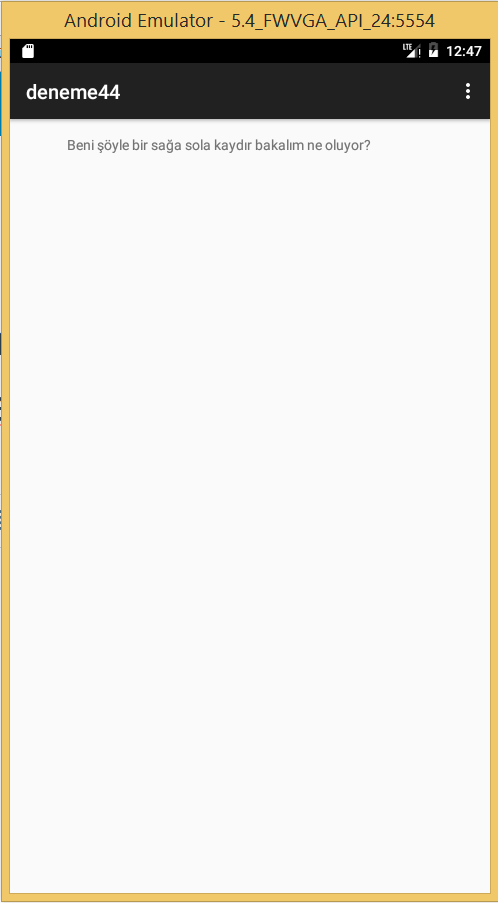
Android Programlama: FragmentManager kullanarak farklı yoldan Sayfa Yenileme Refresh)

2017-01-10_15-47-45
activity_main.xml;
<android.support.v4.view.ViewPager xmlns:android="http://schemas.android.com/apk/res/android"
    xmlns:tools="http://schemas.android.com/tools" android:id="@+id/pager"
    android:layout_width="match_parent" android:layout_height="match_parent"
    tools:context=".MainActivity" />
fragment_main.xml
<RelativeLayout xmlns:android="http://schemas.android.com/apk/res/android"
    xmlns:tools="http://schemas.android.com/tools" android:layout_width="match_parent"
    android:layout_height="match_parent" android:paddingLeft="@dimen/activity_horizontal_margin"
    android:paddingRight="@dimen/activity_horizontal_margin"
    android:paddingTop="@dimen/activity_vertical_margin"
    android:paddingBottom="@dimen/activity_vertical_margin"
    tools:context=".MainActivity$PlaceholderFragment">

    <TextView android:id="@+id/section_label" android:layout_width="wrap_content"
        android:layout_height="wrap_content" />

    <TextView
        android:text="Beni şöyle bir sağa sola kaydır bakalım ne oluyor?"
        android:layout_width="wrap_content"
        android:layout_height="wrap_content"
        android:layout_alignParentTop="true"
        android:layout_toRightOf="@+id/section_label"
        android:layout_toEndOf="@+id/section_label"
        android:layout_marginLeft="41dp"
        android:layout_marginStart="41dp"
        android:id="@+id/textView" />

</RelativeLayout>
MainActivity.java;
package com.example.okul.deneme44;

import java.util.Locale;

import android.support.v7.app.ActionBarActivity;
import android.support.v7.app.ActionBar;
import android.support.v4.app.Fragment;
import android.support.v4.app.FragmentManager;
import android.support.v4.app.FragmentTransaction;
import android.support.v4.app.FragmentPagerAdapter;
import android.os.Bundle;
import android.support.v4.view.ViewPager;
import android.view.Gravity;
import android.view.LayoutInflater;
import android.view.Menu;
import android.view.MenuItem;
import android.view.View;
import android.view.ViewGroup;
import android.widget.TextView;


public class MainActivity extends ActionBarActivity {

    /**
     * The {@link android.support.v4.view.PagerAdapter} that will provide
     * fragments for each of the sections. We use a
     * {@link FragmentPagerAdapter} derivative, which will keep every
     * loaded fragment in memory. If this becomes too memory intensive, it
     * may be best to switch to a
     * {@link android.support.v4.app.FragmentStatePagerAdapter}.
     */
    SectionsPagerAdapter mSectionsPagerAdapter;

    /**
     * The {@link ViewPager} that will host the section contents.
     */
    ViewPager mViewPager;

    @Override
    protected void onCreate(Bundle savedInstanceState) {
        super.onCreate(savedInstanceState);
        setContentView(R.layout.activity_main);


        // Create the adapter that will return a fragment for each of the three
        // primary sections of the activity.
        mSectionsPagerAdapter = new SectionsPagerAdapter(getSupportFragmentManager());

        // Set up the ViewPager with the sections adapter.
        mViewPager = (ViewPager) findViewById(R.id.pager);
        mViewPager.setAdapter(mSectionsPagerAdapter);

    }


    @Override
    public boolean onCreateOptionsMenu(Menu menu) {
        // Inflate the menu; this adds items to the action bar if it is present.
        getMenuInflater().inflate(R.menu.menu_main, menu);
        return true;
    }

    @Override
    public boolean onOptionsItemSelected(MenuItem item) {
        // Handle action bar item clicks here. The action bar will
        // automatically handle clicks on the Home/Up button, so long
        // as you specify a parent activity in AndroidManifest.xml.
        int id = item.getItemId();

        //noinspection SimplifiableIfStatement
        if (id == R.id.action_settings) {
            return true;
        }

        return super.onOptionsItemSelected(item);
    }


    /**
     * A {@link FragmentPagerAdapter} that returns a fragment corresponding to
     * one of the sections/tabs/pages.
     */
    public class SectionsPagerAdapter extends FragmentPagerAdapter {

        public SectionsPagerAdapter(FragmentManager fm) {
            super(fm);
        }

        @Override
        public Fragment getItem(int position) {
            // getItem is called to instantiate the fragment for the given page.
            // Return a PlaceholderFragment (defined as a static inner class below).
            return PlaceholderFragment.newInstance(position + 1);
        }

        @Override
        public int getCount() {
            // Show 3 total pages.
            return 3;
        }

        @Override
        public CharSequence getPageTitle(int position) {
            Locale l = Locale.getDefault();
            switch (position) {
                case 0:
                    return getString(R.string.title_section1).toUpperCase(l);
                case 1:
                    return getString(R.string.title_section2).toUpperCase(l);
                case 2:
                    return getString(R.string.title_section3).toUpperCase(l);
            }
            return null;
        }
    }

    /**
     * A placeholder fragment containing a simple view.
     */
    public static class PlaceholderFragment extends Fragment {
        /**
         * The fragment argument representing the section number for this
         * fragment.
         */
        private static final String ARG_SECTION_NUMBER = "section_number";

        /**
         * Returns a new instance of this fragment for the given section
         * number.
         */
        public static PlaceholderFragment newInstance(int sectionNumber) {
            PlaceholderFragment fragment = new PlaceholderFragment();
            Bundle args = new Bundle();
            args.putInt(ARG_SECTION_NUMBER, sectionNumber);
            fragment.setArguments(args);
            return fragment;
        }

        public PlaceholderFragment() {
        }

        @Override
        public View onCreateView(LayoutInflater inflater, ViewGroup container,
                                 Bundle savedInstanceState) {
            View rootView = inflater.inflate(R.layout.fragment_main, container, false);
            return rootView;
        }
    }

}
AndroidManifest.xml;
<?xml version="1.0" encoding="utf-8"?>
<manifest xmlns:android="http://schemas.android.com/apk/res/android"
    package="com.example.okul.deneme44" >

    <application
        android:allowBackup="true"
        android:icon="@mipmap/ic_launcher"
        android:label="@string/app_name"
        android:theme="@style/AppTheme" >
        <activity
            android:name=".MainActivity"
            android:label="@string/app_name" >
            <intent-filter>
                <action android:name="android.intent.action.MAIN" />

                <category android:name="android.intent.category.LAUNCHER" />
            </intent-filter>
        </activity>
    </application>

</manifest>

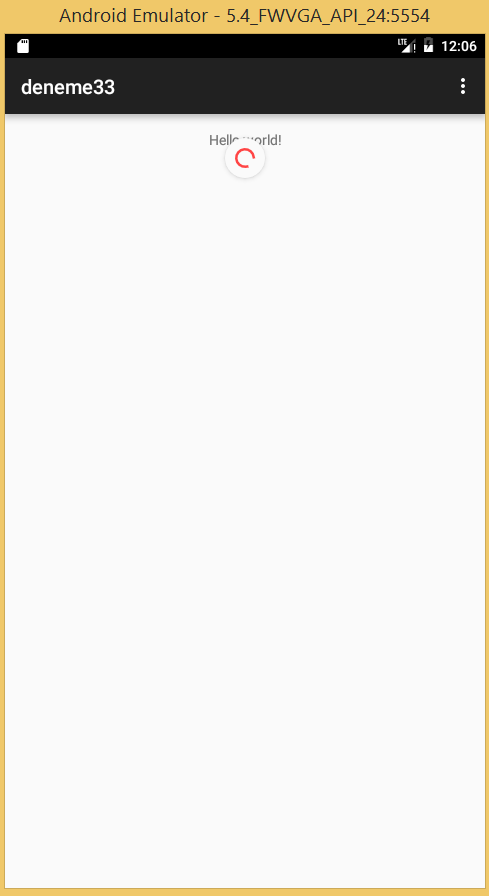
Android Programlama:SwipeRefreshLayout ile Sayfa Yenileme

2017-01-10_15-06-38
activity_main.xml;
<android.support.v4.widget.SwipeRefreshLayout
    xmlns:android="http://schemas.android.com/apk/res/android"
    android:id="@+id/swipe_container"
    android:layout_width="match_parent"
    android:layout_height="match_parent">

    <ScrollView
        android:layout_width="match_parent"
        android:layout_height="match_parent">

        <TextView
            android:text="@string/hello_world"
            android:layout_width="match_parent"
            android:layout_height="wrap_content"
            android:layout_marginTop="16dp"
            android:gravity="center"/>
    </ScrollView>

</android.support.v4.widget.SwipeRefreshLayout>
MainActivity.java;
Package com.example.okul.deneme33;

import android.os.Handler;
import android.support.v4.widget.SwipeRefreshLayout;
import android.support.v7.app.ActionBarActivity;
import android.os.Bundle;
import android.view.Menu;
import android.view.MenuItem;


public class MainActivity extends ActionBarActivity implements SwipeRefreshLayout.OnRefreshListener {

    @Override
    protected void onCreate(Bundle savedInstanceState) {
        super.onCreate(savedInstanceState);
        setContentView(R.layout.activity_main);

        SwipeRefreshLayout swipeLayout = (SwipeRefreshLayout) findViewById(R.id.swipe_container);
     swipeLayout.setOnRefreshListener(this);
        swipeLayout.setColorScheme(android.R.color.holo_blue_bright,
                android.R.color.holo_green_light,
                android.R.color.holo_orange_light,
                android.R.color.holo_red_light);
    }
    @Override
    public void onRefresh() {

    }


    @Override
    public boolean onCreateOptionsMenu(Menu menu) {
        // Inflate the menu; this adds items to the action bar if it is present.
        getMenuInflater().inflate(R.menu.menu_main, menu);
        return true;
    }

    @Override
    public boolean onOptionsItemSelected(MenuItem item) {
        // Handle action bar item clicks here. The action bar will
        // automatically handle clicks on the Home/Up button, so long
        // as you specify a parent activity in AndroidManifest.xml.
        int id = item.getItemId();

        //noinspection SimplifiableIfStatement
        if (id == R.id.action_settings) {
            return true;
        }

        return super.onOptionsItemSelected(item);
    }


}

14 Aralık 2016 Çarşamba

Android Programlama: TimerTask İle Kendi Görev Zamanlayıcınızı Oluşturma


activity_main.xml;
<?xml version="1.0" encoding="utf-8"?>
<RelativeLayout xmlns:android="http://schemas.android.com/apk/res/android"
    xmlns:tools="http://schemas.android.com/tools"
    android:id="@+id/activity_main"
    android:layout_width="match_parent"
    android:layout_height="match_parent"
    android:paddingBottom="@dimen/activity_vertical_margin"
    android:paddingLeft="@dimen/activity_horizontal_margin"
    android:paddingRight="@dimen/activity_horizontal_margin"
    android:paddingTop="@dimen/activity_vertical_margin"
    tools:context="com.example.okul.otomatikgorevzamanlama.MainActivity">

    <TextView
        android:layout_width="wrap_content"
        android:layout_height="wrap_content"
        android:text="saati göster"
        android:layout_alignParentTop="true"
        android:layout_alignParentLeft="true"
        android:layout_alignParentStart="true"
        android:id="@+id/zamantext"
        android:textSize="30sp" />

    <Button
        android:text="5 Saniyede 1 kere çalıştır"
        android:layout_width="wrap_content"
        android:layout_height="wrap_content"
        android:id="@+id/buttonsurekli"
        android:layout_below="@+id/textView"
        android:layout_alignParentLeft="true"
        android:layout_alignParentStart="true"
        android:layout_marginTop="38dp" />

    <Button
        android:text="Dur"
        android:layout_width="wrap_content"
        android:layout_height="wrap_content"
        android:id="@+id/buttondur"
        android:layout_marginTop="13dp"
        android:layout_below="@+id/buttonsurekli"
        android:layout_alignParentLeft="true"
        android:layout_alignParentStart="true" />
</RelativeLayout>


MainActivity.java;
package com.example.okul.otomatikgorevzamanlama;

import android.support.v7.app.AppCompatActivity;
import android.os.Bundle;
import android.view.View;
import android.widget.Button;
import android.widget.TextView;

import java.text.SimpleDateFormat;
import java.util.Calendar;
import java.util.Timer;
import java.util.TimerTask;

public class MainActivity extends AppCompatActivity {
    Button butonsurekli,butondur;
    TextView zamantext;
    //nesneleri koda tanıtma

    Timer ZamanAl;
    GorevZamanlamaSinifi GorevZamanlayici;

    @Override
    protected void onCreate(Bundle savedInstanceState) {
        super.onCreate(savedInstanceState);
        setContentView(R.layout.activity_main);
        butonsurekli=(Button) findViewById(R.id.buttonsurekli);
        butondur=(Button) findViewById(R.id.buttondur);
        zamantext=(TextView) findViewById(R.id.zamantext);
        //xml ile neneleri bağlama
        if(ZamanAl != null){
            ZamanAl.cancel();
        }
        ZamanAl=new Timer();
        GorevZamanlayici=new GorevZamanlamaSinifi();
        //sınıfı çağır


        butonsurekli.setOnClickListener(new View.OnClickListener() {
            @Override
            public void onClick(View view) {

                ZamanAl.schedule(GorevZamanlayici,1000,5000);
                //her 5 saniyede bir görevi tekrarla
            }
        });

        butondur.setOnClickListener(new View.OnClickListener() {
            @Override
            public void onClick(View view) {
                if (ZamanAl!=null){
                    ZamanAl.cancel();
                    ZamanAl = null;
                    //işlemi durdur
                }
            }
        });
    }
    //zamanlama için sınıf üretimi
    class GorevZamanlamaSinifi extends TimerTask {
    @Override
    public void run() {
        Calendar takvim = Calendar.getInstance();
        SimpleDateFormat BasTarihAl =
                new SimpleDateFormat("dd:MMMM:yyyy HH:mm:ss a");
        final String TarihStringi = BasTarihAl.format(takvim.getTime());

        runOnUiThread(new Runnable(){

            @Override
            public void run() {
                zamantext.setText(TarihStringi);
            }});
    }

}
} not: Program her 5 saniyede bir zaman değerini text kutusuna alır.

29 Kasım 2016 Salı

FLASH DİSKLERİ VİRÜSLERE KAPATIN, KÖKTEN ENGELLEYİN. ÇİFT YÖNLÜ KORUMA ve KESİN ÇÖZÜM

Flash diskte kısayol oluşturan virüslerden kurtulmak ve tüm flash disk virüs sorunlarını kalıcı bir şekilde çözmek için aşağıda yapılan tarifleri sırasıyla ve dikkatle uygulayın.
Bu uygulama; Windows 7, 8 ve windows 10 işletim sistemlerinde yapılmış olup, virüslü bilgisayarlardan bile koruma uygulanan flash disklere virüs bulaşmadığı gibi, dosya ile klasörler gizli ve görünmez olmamıştır. Uygulama, disk ve klasörün “güvenlik erişim izinleri” değiştirilerek yapılmıştır.
Ön Hazırlık: (a- Flash disk boş olmalıdır. (b- Disk dolu ise yedeklenmesi gerekebilir. (c- Virüs temizliği gerekebilir. Flash disk’e biçimlendirme (format) yapılacağından, boş olmayan veya kısayol virüsü bulaşıp içi gizlenmiş ve içinde önemli veriler olan disk’in yedeklenmesi gerekiyor.
1. Adım: Flash diski, “Dosya sistemi” NTFS olacak şekilde seçip biçimlendirelim. Ekran görüntüsünde olduğu gibi.
2. Adım: NTFS olarak biçimlendirme bittikten sonra belleğin içinde yeni bir klasör, örn. Login adında bir klasör oluşturun. Adı önemli değil, istediğiniz adı verebilirsiniz. Sonra ilk klasör (Login) içerisine DOSYALAR adında tekrar bir klasör oluşturun. Yani iç içe iki klasör olacak. İşlemlerin sonunda flash bellek ve birinci klasör (login) korumalı duruma gelecek. Ancak ikinci klasörü (DOSYALAR) kullanabileceksiniz.
3. Adım: Bu adımda flash disk “güvenlik erişim izinleri” ayarı yapılacaktır. Windows’ta bulunan bu özellik NTFS dosya sistemi ile gelmektedir, FAT32 ve diğer dosya sistemlerinde yoktur. Bunun için flash diske NTFS biçimlendirme yapıyoruz.
1. ve 2. adımı yapmadan bu ayarlara başlamayın.


“Ntfs drive protection” program kullanmadan flash disk’in “güvenlik erişim izinlerini” manüel olarak değiştirmek için,


“Bilgisayarım” penceresinden flash disk üzerine sağ tıklayarak açılan menüden “Özellikler” den “Güvenlik” sekmesi, izinleri değiştirmek için Düzenle’yi tıklatın


Tam denetim, Değiştirme ve en aşağıdan Yazma kutucukların onayları kaldırılır.


Uygula ve Tamam diyerek işlem bitirilir. Ntfs drive protection programının otomatik yaptığı işlem bu sonuçta.
Üçüncü adımda geçen a- veya b- maddesindeki “erişim izin” ayarlarından birini yaptıktan sonra flash disk içinde oluşturduğumuz ilk (login) klasör içindeki ikinci “DOSYALAR” klasörü üzerine sağ tıklayıp Özellikler ve Güvenlik sekmesinden ⇓
“Düzenle…”yi tıklayıp, izin ayarlarını ekran görüntüsündeki gibi yapalım. “Tam denetim” kutucuğu işaretlendiğinde alttaki kutucukların hepsi birden işaretlendiği görülecektir. Ortadaki üç kutucuk soluk bir şekilde zaten işaretlidir. İşlem tamamlanmıştır. Pencereleri Uygula ve Tamam ile kapatalım.
Burada ilk (Login) klasör izinleri flash diskin izinleri gibi kısıtlı oluyor. Sadece alt klasör “DOSYALAR” izinlerini tam erişimli yapıyorum. Çünki kullanacağım dosyaları bu klasörde barındıracağım.
Artık flash disk içine (root (kök) sağ klik ile yeni bir dosya veya klasör oluşturmak istediğimizde Hedef Klasöre Erişim Engellendi uyarısı çıkacaktır.
Bu uyarı, flash diskin “boot (ilk alan) kısmına virüs giremeyeceği” anlamına gelmektedir.
Bundan sonra kendimiz de flash diske doğrudan dosya kopyalama veya gönder yapamayacağımızı unutmayalım. Ancak flash disk içerisine oluşturduğumuz Login klasörü içindeki DOSYALAR klasörü içine kopyala/yapıştır ve dosyalarımızda değişiklik yapabileceğiz, ayrıca flash diskten başka bir bilgisayara program ve dosya yüklenebilecektir.

Kaynak:
http://blog.sivrihisar.web.tr/flash-bellek-kisayol-virusu-ve-cozumu.html